
Written by Craig Fearn
Director
Last updated: 26 March 2026
Part of our complete guide: SEO Fundamentals for UK Small Businesses: The 7 Things Google Actually Cares About
On-page SEO covers everything you control on individual pages of your website - the page title, page content, image alt text, schema, and internal links. These are elements you can optimise without waiting for anyone else. This checklist covers the 15 elements that matter most, each one with a clear action you can take today using free tools and basic SEO techniques.
TL;DR: Consistent publication of satisfying content is Google’s top-weighted ranking factor (First Page Sage). Google shortens 61% of title tags because they are too long (First Page Sage). And mobile devices account for 56.86% of UK web traffic (SQ Magazine), making mobile optimisation non-negotiable.
Use this as a reference when creating new pages or auditing existing ones. You don’t need perfect scores on every element, but covering these basics puts you ahead of most competitors. Optimising websites for Cornwall businesses, we find that systematically working through this checklist produces measurable ranking improvements within 8-12 weeks.
| Element | Target | Priority |
|---|---|---|
| Title tag | Under 60 chars, keyword near start | Critical |
| Meta description | Under 160 chars, includes CTA | High |
| URL structure | Short, descriptive, hyphens | High |
| H1 tag | Exactly one per page, matches topic | Critical |
| Content quality | Thorough, satisfying, expert | Critical |
| Internal links | 2–5 per page, descriptive anchors | High |
| Image alt text | Descriptive, keyword where natural | Moderate |
| Page speed (mobile) | LCP under 2.5 seconds | Critical |
Start Here: Match the Page to Search Intent
Before tweaking a single tag, work out what searchers actually want when they type your target query. Search intent is the goal behind the keyword - informational, commercial, navigational, or transactional. Match the page format to that intent, or no on-page tweak will save you.
Type your keyword into Google. Look at the top ten results. Are they guides, product pages, comparison posts, or local listings? That pattern tells you the format Google has decided fits the query. A how-to guide will not rank against a SERP full of product pages, no matter how clean your title tag is. Get the search intent match right first - then the rest of this checklist actually pays off.
On-page work also lives alongside technical SEO - the crawlability, indexing, sitemap, and rendering layer that determines whether Google can read your page at all. Technical SEO sits underneath; on-page sits on top. Both need to work. If Google cannot crawl the page, your perfect title tag is invisible.
1. Title Tag: Is It Optimised?
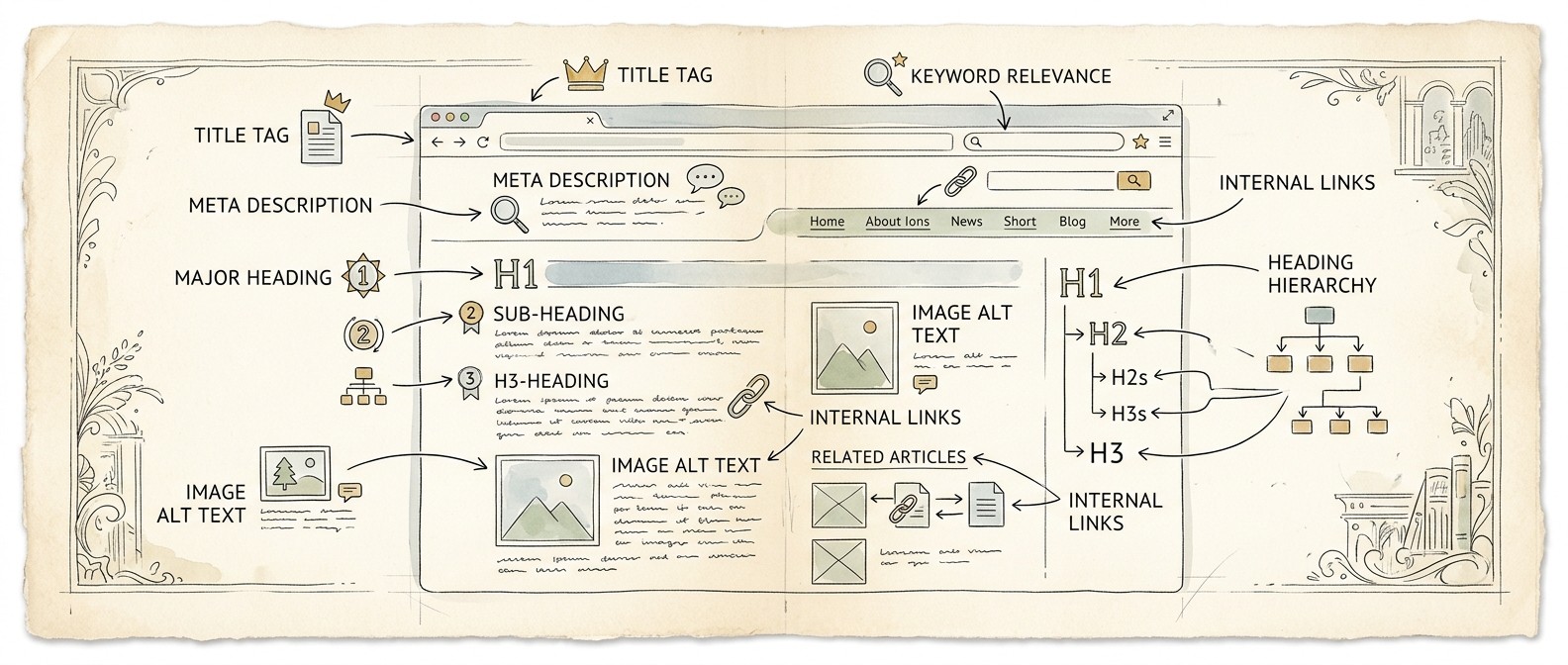
Your title tag appears in search results and browser tabs, making it one of the strongest on-page ranking signals. First Page Sage found Google shortens 61% of title tags because they’re too long.
Keep it under 60 characters to avoid truncation. Include your primary keyword near the beginning. Make it compelling - this is your headline in search results. Each page needs a unique title; don’t duplicate across pages.
2. Meta Description: Does It Encourage Clicks?
Meta descriptions don’t affect rankings directly but drive click-through rates, which feeds back as a strong indirect signal. A compelling description turns a search impression into a visitor.
Stay under 160 characters. Include your keyword naturally. Focus on what the reader will get from clicking. Add a call to action if appropriate. Unique descriptions for each page - duplicate descriptions waste opportunities to differentiate your pages in search results.
3. URL Structure: Is It Clean and Descriptive?
URLs should be readable by humans and include relevant keywords. A clean URL tells both users and Google what the page is about before they even click.
Good: /blog/on-page-seo-checklist. Bad: /blog/post-id-12847. Use hyphens between words. Keep URLs short but descriptive. See our URL structure guide for detailed best practices.
4. H1 Tag: Is There Exactly One?
Each page needs exactly one H1 tag, typically matching or closely related to your title. The H1 tells Google and users the primary topic of the page - multiple H1s dilute that signal.
Include your primary keyword. Make it descriptive and compelling. The H1 should clearly communicate the page’s main topic at a glance. If a visitor reads only your H1, they should understand what the page covers.
5. Header Hierarchy: Are H2s and H3s Logical?
Headers structure content for readability and help search engines understand your page organisation. A logical hierarchy makes your content scannable for both users and search engine crawlers, and it directly influences your search ranking by signalling which subtopics the page covers.
Use H2s for main sections, H3s for subsections within those. Do not skip levels (H1 to H3 without H2). Include secondary keywords naturally in subheadings. Headers break up content and improve user experience - pages with clear headers keep visitors engaged longer.
6. Content Quality: Is It Genuinely Useful?
Content should thoroughly answer what searchers want. Google’s helpful content guidelines ask pages to show expertise and deliver substantial value.
Thin content won’t rank. Ask: would someone be satisfied finding this page, or return to search for something better? If you’re covering a topic, cover it thoroughly. Our blog writing services help businesses hit that standard.
7. Keyword Usage: Natural or Forced?
Include keywords naturally throughout your content. If it sounds awkward when read aloud, you are overdoing it - and Google’s algorithms are increasingly good at detecting unnatural keyword usage.
Your primary keyword should appear in the title, H1, first paragraph, and naturally throughout the body. Related terms and synonyms matter too - Google understands semantic relationships and actually prefers varied language over repetitive keyword use. Never sacrifice readability for keyword density.
8. Internal Links: Are You Connecting Related Pages?
Internal linking is the most underused on-page lever in your SEO strategy. An internal link points from one page on your site to another, and every internal link sends two signals: it helps search engines understand which topics your site covers in depth, and it spreads ranking authority from established pages to newer ones. Ahrefs found pages with more internal links pointing to them rank higher because Google treats internal links as a signal of importance.
Build internal linking into a real system, not an afterthought. Each new page should link to 2-5 relevant internal pages, and each existing pillar page should pick up a link from any new content covering the same topic cluster. Use descriptive anchor text - “learn what SEO means” beats “click here.” Avoid linking the same anchor text repeatedly to the same destination, and never stuff exact-match keywords into every link.
Internal link audit, in five minutes: pick your three most important pages. How many other pages on your site link to them? If the answer is one or two, you have an internal linking problem. Add contextual links from related blog posts and service pages. Our SEO fundamentals guide explains how internal linking distributes authority across a site.
9. External Links: Are You Citing Quality Sources?
Linking to authoritative external sources signals that you have done your research and builds credibility with both users and search engines.
Reference official sources, research, and industry publications where relevant. It builds credibility and helps Google understand your content’s context. Do not link to competitors’ commercial pages, but educational resources and data sources are fair game and expected.
10. Images: Are They Optimised?
Images need alt text, compression, and descriptive file names. Unoptimised images are one of the most common causes of slow page loading, which directly hurts your rankings.
Every image needs alt text describing what it shows - important for accessibility and Google Image search. Compress images to reduce file size without visible quality loss. Use descriptive file names: “kitchen-renovation-falmouth.jpg” not “IMG_4521.jpg.”
11. Page Load Speed and Core Web Vitals
Slow web pages hurt rankings and frustrate users. Page load speed sits alongside content quality at the top of the on-page priority list because every visitor experiences it before they read a single word. Google’s Core Web Vitals - Largest Contentful Paint (LCP), Interaction to Next Paint (INP), and Cumulative Layout Shift (CLS) - are confirmed ranking factors that measure real-world performance, not lab scores.
Run PageSpeed Insights on important pages on your website. The numbers you want: LCP under 2.5 seconds, INP under 200 milliseconds, CLS under 0.1. Target above 50 on mobile at minimum, above 80 ideally. Speed on mobile matters more than desktop because connections vary wildly - a page that loads in 1.2 seconds on fibre can take 6 seconds on a weak 4G signal.
Common fixes, in order of impact: compress and lazy-load images, enable browser caching, minimise JavaScript, defer non-critical scripts, and serve fonts locally rather than from third-party domains. Hosting matters too - cheap shared hosting often caps performance no matter what you do at the code level. If your Core Web Vitals are red after every fix you can think of, the host is usually the bottleneck.
12. Mobile Experience: Does It Work on Phones?
Google uses mobile-first indexing, so your mobile experience sets your ranking ceiling. With 56.86% of UK web traffic from mobile (SQ Magazine), this is non-negotiable.
Test on actual devices, not just browser resizing. Text should be readable without zooming. Buttons should be tappable with thumbs. Forms should be easy to complete. Content should never require horizontal scrolling. Our guide to website design and SEO covers mobile optimisation in detail.
13. Schema Markup: Have You Added Structured Data?
Schema markup is structured code that helps search engines understand your content beyond the words on the page. It can enable rich results in search - star ratings, FAQ dropdowns, and business information panels - that increase your click-through rate and reinforce your search ranking signals.
Local businesses should add LocalBusiness schema. Articles can use Article schema. Products get Product schema with reviews and pricing. Use Google’s Rich Results Test to validate your markup.
14. Content Freshness: Is Information Current?
Outdated content hurts rankings, especially for time-sensitive topics. Google prefers fresh, accurate content over stale information, and users lose trust the moment they hit old statistics or advice.
Review important pages annually at minimum. Update statistics, fix outdated advice, refresh examples. Add “Last updated” dates where relevant. This ongoing maintenance is part of why our SEO services include regular content audits.
15. Call to Action: Is the Next Step Clear?
Each page should guide visitors towards a clear action. The next step improves user experience and conversion rates - indirect SEO signals Google weighs into ranking decisions.
What do you want visitors to do after reading? Contact you? Read another article? Make a purchase? Make the next step obvious. Clear calls to action improve user experience and conversion rates - both of which indirectly support your SEO.
Frequently Asked Questions
How long does it take to complete this checklist?
For a single page, allow 30 to 60 minutes to audit and fix issues. For a full website audit, plan for a few hours spread over a week. Prioritise your homepage and main service pages first, then work through blog posts and secondary pages.
Which checklist items have the biggest impact?
Title tags, content quality, and page speed typically deliver the most noticeable improvements. If you can only address three items, start with these. Title tags directly influence both rankings and click-through rates, content quality is the top ranking factor, and speed affects every visitor.
Do I need to check every item on every page?
Focus on your highest-value pages first - your homepage, main service pages, and top-traffic blog posts. These pages have the most ranking potential and traffic, so improvements there deliver the biggest returns. Apply the full checklist to new content as you create it.
How often should I re-audit my pages?
Quarterly for your most important pages. Annually for everything else. After any major website update or redesign, run through the full checklist again. SEO isn’t a one-time task - ongoing maintenance keeps your pages competitive.
Can I automate any of these checks?
Yes. Tools like Screaming Frog can audit title tags, meta descriptions, headers, broken links, and image alt text across your entire site automatically. Google Search Console monitors indexing and technical issues continuously. Our free SEO tools guide covers which tools automate which checks.
What should I do after completing this checklist?
Monitor your results in Google Search Console for 8 to 12 weeks - a ranking checker tool can help you track position changes alongside Search Console data. Then move on to off-page SEO - building backlinks and citations. Free SEO tools like Google Search Console, PageSpeed Insights, and Ahrefs Webmaster Tools cover most of what a small business needs to keep page SEO healthy month after month.
What is the difference between on-page and technical SEO?
On-page work covers content and HTML elements on a page - title, headings, copy, internal links, and images. Technical SEO covers infrastructure - crawlability, indexing, sitemaps, speed, structured data delivery, and rendering. The first determines whether a page deserves to rank; the second determines whether Google can read and index it. Both are ranking factors, and both matter.
How does this checklist help me rank higher?
These on-page best practices give search engines and users a clear picture of what each page on your site is about and which queries it should match. Strong title tags, useful content, clean URL structure, and internal links pointing to a page all reinforce the topic signal. Combine that with fast performance and a solid mobile experience, and you give Google the clearest possible reason to rank higher in search results for your target queries.
For broader guidance beyond individual pages, explore our complete SEO fundamentals guide or learn about free tools to audit your site. If you are a Cornwall or Devon business, our guides to SEO in Cornwall and SEO in Devon show how to apply these principles to local SEO with a regional focus. If you want professional help, get in touch for a free conversation about your website.
Need help with this?
We work with Cornwall small businesses on the exact challenges covered in this article. Free 30-minute call, no pressure.
Get in touchCraig Fearn
Director
Craig is Director of Outcome Digital Marketing. He brings over a decade of C-suite advisory experience, having advised senior executives and boards on organisational strategy before focusing on the marketing decisions that move the needle for smaller businesses. As a Fellow of the Royal Society for Public Health (FRSPH) and Fellow of the Chartered Management Institute (FCMI), he applies evidence-based thinking to marketing - helping Cornwall and UK businesses make informed decisions backed by research, not hype.